background Layer 1 background Layer 1 background Layer 1 background Layer 1 background Layer 1

Unlocking Productivity: A Comprehensive Guide to Mastering the Google Workspace Ecosystem

Updated 05/08/2026

Modern work is no longer confined to a single office or a single device. Teams collaborate across countries, meetings happen online, documents are edited simultaneously, and AI is becoming an everyday assistant. To keep everything connected, businesses need an integrated productivity platform rather than a collection of disconnected tools.

Google Workspace provides exactly that. It combines communication, collaboration, cloud storage, document creation, scheduling, and AI-powered assistance into one ecosystem. Whether you're a freelancer, startup founder, educator, or part of a large enterprise, understanding how these tools work together can significantly improve productivity.

In this guide, we'll explore the major Google Workspace apps—including Gmail, Google Meet, Google Chat, Google Calendar, Google Drive, Google Docs, Google Sheets, and Gemini—and show how they create a seamless digital workplace.

What Is Google Workspace?

Google Workspace is Google's cloud-based productivity suite that helps individuals and organizations collaborate from anywhere. Instead of relying on separate software for email, meetings, file storage, spreadsheets, and communication, Workspace integrates everything into a single platform.

Key benefits include:

  • Cloud-based access from any device
  • Real-time collaboration
  • Automatic file saving
  • Enterprise-grade security
  • AI-powered assistance
  • Seamless integration across apps

Let's explore each application.

Gmail: More Than Just Email

logo

Gmail

Communication

  • 4.2
    Ratings
  • 10B+
    Downloads
  • Everyone
    Age
START
logo

Gmail serves as the communication hub of Google Workspace. Beyond sending emails, it helps users organize conversations, schedule messages, categorize inboxes, and integrate with other Workspace apps.

Key Features

  • Smart Compose and Smart Reply
  • Labels and filters for organization
  • Powerful search functionality
  • Email scheduling
  • Confidential Mode
  • Built-in phishing and spam protection

Productivity Tips

  • Create filters to automatically organize incoming emails.
  • Schedule emails to arrive during recipients' working hours.
  • Convert emails into Calendar events with one click.
  • Launch Google Meet meetings directly from Gmail.

Best for:

  • Business communication
  • Customer support
  • Team collaboration
  • Professional correspondence

Google Meet: Simple Video Conferencing

logo

Google Meet (original)

Business

  • 4.1
    Ratings
  • 500M+
    Downloads
  • Everyone
    Age
START
logo

Remote work depends on reliable virtual meetings. Google Meet provides secure, high-quality video conferencing directly within Workspace.

Main Features

  • HD video calls
  • Screen sharing
  • Live captions
  • Meeting recordings
  • Noise cancellation
  • Breakout rooms
  • Polls and Q&A

Meet integrates naturally with Google Calendar, making scheduling effortless.

Best Use Cases

  • Team meetings
  • Client presentations
  • Online education
  • Interviews
  • Remote collaboration

Google Chat: Real-Time Team Messaging

logo

Google Chat

Business

  • 4.4
    Ratings
  • 10M+
    Downloads
  • Everyone
    Age
START
logo

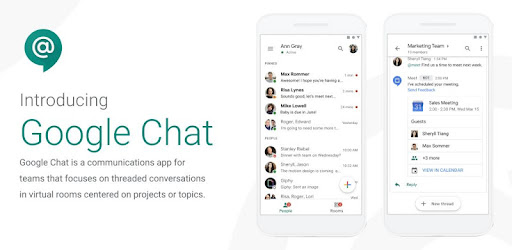
Google Chat replaces long email chains with organized conversations.

Instead of searching through dozens of emails, teams can create dedicated spaces for projects, departments, or clients.

Features

  • Team Spaces
  • Threaded conversations
  • File sharing
  • Task assignments
  • Integration with Docs and Drive
  • Bots and automation

Google Chat works especially well for agile teams that require continuous communication.

Google Calendar: Organize Every Minute

logo

Google Calendar

Productivity

  • 4.4
    Ratings
  • 1B+
    Downloads
  • Everyone
    Age
START
logo

Google Calendar helps users manage schedules while coordinating meetings across teams.

Features

  • Shared calendars
  • Multiple calendar views
  • Automatic time zone adjustment
  • Appointment scheduling
  • Meeting reminders
  • Integration with Meet

Productivity Tips

  • Color-code calendars for different projects.
  • Set recurring meetings.
  • Share availability with teammates.
  • Attach documents directly to meeting invitations.

Google Drive: Centralized Cloud Storage

Google Drive acts as the central storage system for all Workspace files.

Instead of emailing attachments repeatedly, users can simply share secure links.

Benefits

  • Cloud storage
  • Version history
  • File recovery
  • Shared folders
  • Permission management
  • Offline access

Supported file types include:

  • Documents
  • PDFs
  • Images
  • Videos
  • Presentations
  • Spreadsheets
  • ZIP archives

Drive ensures everyone works on the latest version of every file.

Google Docs: Collaborative Document Editing

logo

Google Drive

Productivity

  • 4.3
    Ratings
  • 5B+
    Downloads
  • Everyone
    Age
START
logo

Google Docs eliminates the need to send multiple document versions back and forth.

Multiple users can edit simultaneously while changes appear instantly.

Features

  • Real-time collaboration
  • Commenting
  • Suggestion mode
  • Version history
  • Templates
  • Voice typing

Common Uses

  • Reports
  • Meeting notes
  • Proposals
  • Blog drafts
  • Documentation
  • Manuals

Because every revision is automatically saved, there's no need to worry about losing work.

Google Sheets: Powerful Spreadsheet Collaboration

logo

Google Sheets

Productivity

  • 4.1
    Ratings
  • 1B+
    Downloads
  • Everyone
    Age
START
logo

Google Sheets transforms traditional spreadsheets into collaborative workspaces.

Key Capabilities

  • Formulas
  • Charts
  • Pivot tables
  • Conditional formatting
  • Data validation
  • Connected data sources

Practical Applications

  • Budget tracking
  • Sales dashboards
  • Inventory management
  • Marketing analytics
  • Financial forecasting
  • Project tracking

Multiple teammates can update data simultaneously without creating conflicting versions.

Gemini: AI Built Into Google Workspace

logo

Google Gemini

Productivity

  • 3.2
    Ratings
  • 100K+
    Downloads
  • Everyone
    Age
START
logo

Gemini is Google's AI assistant integrated throughout Workspace.

Instead of switching to external AI tools, users can leverage AI directly within Gmail, Docs, Sheets, Meet, and other Workspace applications.

What Gemini Can Do

In Gmail

  • Draft emails
  • Rewrite messages
  • Summarize long conversations
  • Suggest replies

In Google Docs

  • Generate content
  • Rewrite paragraphs
  • Brainstorm ideas
  • Summarize documents
  • Improve writing style

In Google Sheets

  • Explain formulas
  • Analyze datasets
  • Generate tables
  • Create summaries
  • Identify trends

In Google Meet

  • Meeting summaries
  • Automatic notes
  • Action items
  • Key discussion highlights

Gemini significantly reduces repetitive work and allows employees to focus on higher-value tasks.

How Google Workspace Apps Work Together

The real strength of Google Workspace lies in integration.

Imagine a typical workday:

  1. Receive a client email in Gmail.
  2. Schedule a meeting in Google Calendar.
  3. Join the meeting through Google Meet.
  4. Take collaborative notes in Google Docs.
  5. Discuss follow-up tasks in Google Chat.
  6. Store project files in Google Drive.
  7. Track project metrics in Google Sheets.
  8. Ask Gemini to summarize the meeting and draft follow-up emails.

Instead of switching between unrelated software platforms, everything remains connected.

Benefits for Different Types of Users

Small Businesses

  • Lower software costs
  • Easy collaboration
  • Secure cloud storage
  • Professional email

Remote Teams

  • Video meetings
  • Shared documents
  • Instant messaging
  • Cross-device access

Students and Educators

  • Assignment collaboration
  • Shared class materials
  • Online learning
  • Research organization

Enterprises

  • Advanced security
  • Administrative controls
  • Compliance features
  • Large-scale collaboration

Tips to Maximize Productivity

To get the most from Google Workspace:

  • Store files in shared Drive folders instead of sending attachments.
  • Use Google Calendar to automate meeting scheduling.
  • Create collaborative Docs instead of circulating document versions.
  • Organize team discussions with Google Chat Spaces.
  • Build live dashboards in Google Sheets.
  • Use Gemini to draft emails, summarize meetings, and generate first drafts.
  • Keep projects connected by linking files, meetings, and conversations across Workspace.

Frequently Asked Questions

Is Google Workspace free?

Google offers free versions of many individual apps for personal use, while Google Workspace provides paid plans with additional business features such as custom email domains, larger storage limits, enhanced security, and advanced administrative controls.

Can multiple people edit a document at the same time?

Yes. Google Docs, Sheets, and Slides support real-time collaboration, allowing multiple users to edit simultaneously while viewing each other's changes live.

Does Google Workspace work offline?

Yes. Gmail, Docs, Sheets, and Drive support offline access when enabled, allowing users to continue working without an internet connection and sync changes later.

Is Google Workspace secure?

Google Workspace includes encryption, multi-factor authentication support, spam protection, advanced admin controls, and compliance features designed to protect business data.

What is Gemini used for in Google Workspace?

Gemini acts as an AI assistant that can draft emails, generate and refine content, summarize meetings and documents, analyze spreadsheet data, and automate routine tasks across multiple Workspace applications.

Final Thoughts

Google Workspace is much more than a collection of productivity apps—it's a unified ecosystem designed to simplify communication, collaboration, and project management. From Gmail and Google Meet to Google Drive, Docs, Sheets, and the AI-powered capabilities of Gemini, every application works together to reduce friction and help teams accomplish more.

Whether you're managing a growing business, collaborating with remote colleagues, or organizing personal projects, mastering the Google Workspace ecosystem can streamline your workflow, improve teamwork, and free up more time for meaningful work. By embracing these interconnected tools and making AI a natural part of your daily routine, you'll be well equipped to work smarter, collaborate faster, and stay productive in today's digital-first workplace.


Latest Articles